


Kindly save it...... All government office related links are available....
This section provides you with information and useful links to avail various Citizen Services being provided by the Central & State/UT Governments inIndia
Obtain:
* Birth Certificate <http://www.india.gov.in/howdo/howdoi.php?service=1>
* Caste Certificate <http://www.india.gov.in/howdo/howdoi.php?service=4>
* Tribe Certificate <http://www.india.gov.in/howdo/otherservice_details.php?service=8>
* Domicile Certificate <http://www.india.gov.in/howdo/howdoi.php?service=5>
* Driving Licence <http://www.india.gov.in/howdo/howdoi.php?service=6>
* Marriage Certificate <http://www.india.gov.in/howdo/howdoi.php?service=3>
* Death Certificate <http://www.india.gov.in/howdo/howdoi.php?service=2>
* Search More - How do I <http://www.india.gov.in/howdo/advancedsearch.php>
Apply for:
* PAN Card <http://www.india.gov.in/howdo/otherservice_details.php?service=15>
* TAN Card <http://www.india.gov.in/howdo/otherservice_details.php?service=3>
* Ration Card <http://www.india.gov.in/howdo/howdoi.php?service=7>
* Passport <http://www.india.gov.in/howdo/otherservice_details.php?service=2>
* Inclusion of name in the Electoral Rolls <http://www.india.gov.in/howdo/howdoi.php?service=10>
* Search More - How do I <http://www.india.gov.in/howdo/advancedsearch.php>
Register:
* Land/Property <http://www.india.gov.in/howdo/howdoi.php?service=9>
* Vehicle <http://www.india.gov.in/howdo/howdoi.php?service=13>
* With State Employment Exchange <http://www.india.gov.in/howdo/howdoi.php?service=12>
* As Employer <http://www.india.gov.in/howdo/otherservice_details.php?service=17>
* Company <http://www.india.gov.in/howdo/otherservice_details.php?service=19>
* .IN Domain <http://www.india.gov.in/howdo/otherservice_details.php?service=18>
* GOV.IN Domain <http://www.india.gov.in/howdo/otherservice_details.php?service=25>
* Search More - How do I <http://www.india.gov.in/howdo/advancedsearch.php>
Check/Track:
* Waiting list status for Central Government Housing <http://www.india.gov.in/howdo/otherservice_details.php?service=9>
* Status of Stolen Vehicles <http://www.india.gov.in/howdo/otherservice_details.php?service=1>
* Land Records <http://www.india.gov.in/landrecords/index.php>
* Causelist of Indian Courts <http://www.india.gov.in/howdo/otherservice_details.php?service=7>
* Court Judgements (JUDIS ) <http://www.india.gov.in/howdo/otherservice_details.php?service=24>
* Daily Court Orders/Case Status <http://www.india.gov.in/howdo/otherservice_details.php?service=21>
* Acts of Indian Parliament <http://www.india.gov.in/howdo/otherservice_details.php?service=13>
* Exam Results <http://www.india.gov.in/howdo/otherservice_details.php?service=16>
* Speed Post Status <http://www.india.gov.in/howdo/otherservice_details.php?service=10>
* Agricultural Market Prices Online <http://www.india.gov.in/howdo/otherservice_details.php?service=6>
* Search More - How do I <http://www.india.gov.in/howdo/advancedsearch.php>
Book/File/Lodge:
* Train Tickets Online <http://www.india.gov.in/howdo/otherservice_details.php?service=5>
* Air Tickets Online <http://www.india.gov.in/howdo/otherservice_details.php?service=4>
* Income Tax Returns <http://www.india.gov.in/howdo/otherservice_details.php?service=12>
* Complaint with Central Vigilance Commission (CVC) <http://www.india.gov.in/howdo/otherservice_details.php?service=14>
* Search More - How do I <http://www.india.gov.in/howdo/advancedsearch.php>
Contribute to:
* Prime Minister's Relief Fund <http://www.india.gov.in/howdo/otherservice_details.php?service=11>
* Search More - How do I <http://www.india.gov.in/howdo/advancedsearch.php>
Others:
* Send Letters Electronically <http://www.india.gov.in/howdo/otherservice_details.php?service=20>
* Search More - How do I <http://www.india.gov.in/howdo/advancedsearch.php>
Recently Added Online Services:
* Tamil Nadu: Online application of marriage certificate for persons having registered their marriages <http://www.india.gov.in/howdo/onlineservice_detail.php?service=2691>
* Tamil Nadu: Online District wise soil Details of Tamil Nadu <http://www.india.gov.in/howdo/onlineservice_detail.php?service=2693>
* Tamil Nadu: View Water shed Atlas of Tamil Nadu <http://www.india.gov.in/howdo/onlineservice_detail.php?service=2694>
* Tamil Nadu: E-Pension District Treasury Tirunelveli <http://www.india.gov.in/howdo/onlineservice_detail.php?service=2695>
* Meghalaya: Search Electoral Roll Online by Name (2008) <http://www.india.gov.in/howdo/onlineservice_detail.php?service=2697>
* Meghalaya: Search Electoral Roll Online by EPIC number (2008) <http://www.india.gov.in/howdo/onlineservice_detail.php?service=2698>
* Meghalaya: Search Electoral Roll Online by House number (2008) <http://www.india.gov.in/howdo/onlineservice_detail.php?service=2699>
* Meghalaya: Search Electoral Roll Online by Part number (2008) <http://www.india.gov.in/howdo/onlineservice_detail.php?service=2700>
* Himachal Pradesh: Revised Pay and Arrears Calculator-Fifth Pay <http://www.india.gov.in/howdo/onlineservice_detail.php?service=2702>
* Andhra Pradesh: Online Motor Driving School Information <http://www.india.gov.in/howdo/onlineservice_detail.php?service=2705>
Global Navigation:
* Citizens <http://www.india.gov.in/citizen.php>
* Business (External website that opens in a new window) <http://business.gov.in/>
* Overseas <http://www.india.gov.in/overseas.php>
* Government <http://www.india.gov.in/govt.php>
* Know India <http://www.india.gov.in/knowindia.php>
* Sectors <http://www.india.gov.in/sector.php>
* Directories <http://www.india.gov.in/directories.php>
* Documents <http://www.india.gov.in/documents.php>
* Forms <http://www.india.gov.in/forms/forms.php>
* Acts <http://www.india.gov.in/govt/acts.php>
* Rules <http://www.india.gov.in/govt/rules.php>
* Schemes <http://www.india.gov.in/govt/schemes.php>
* Tenders <http://www.india.gov.in/tenders.php>
* Home <http://www.india.gov.in/default.php>
* About the Portal <http://www.india.gov.in/abouttheportal.php>
* Site Map <http://www.india.gov.in/sitemap.php>
* Link to Us <http://www.india.gov.in/linktous.php>
* Suggest to a Friend <http://www.india.gov.in/suggest/suggest.php>
* Help <http://www.india.gov.in/help.php>
* Terms of Use <http://www.india.gov.in/termscondtions.php>
* Feedback <http://www.india.gov.in/feedback.php>
* Contact Us <http://www.india.gov.in/contactus.php>
* Accessibility Statement <http://www.india.gov.in/accessibilitystatement.php>
This section provides you with information and useful links to avail various Citizen Services being provided by the Central & State/UT Governments in
Obtain:
* Birth Certificate <http://www.india.gov.in/howdo/howdoi.php?service=1>
* Caste Certificate <http://www.india.gov.in/howdo/howdoi.php?service=4>
* Tribe Certificate <http://www.india.gov.in/howdo/otherservice_details.php?service=8>
* Domicile Certificate <http://www.india.gov.in/howdo/howdoi.php?service=5>
* Driving Licence <http://www.india.gov.in/howdo/howdoi.php?service=6>
* Marriage Certificate <http://www.india.gov.in/howdo/howdoi.php?service=3>
* Death Certificate <http://www.india.gov.in/howdo/howdoi.php?service=2>
* Search More - How do I <http://www.india.gov.in/howdo/advancedsearch.php>
Apply for:
* PAN Card <http://www.india.gov.in/howdo/otherservice_details.php?service=15>
* TAN Card <http://www.india.gov.in/howdo/otherservice_details.php?service=3>
* Ration Card <http://www.india.gov.in/howdo/howdoi.php?service=7>
* Passport <http://www.india.gov.in/howdo/otherservice_details.php?service=2>
* Inclusion of name in the Electoral Rolls <http://www.india.gov.in/howdo/howdoi.php?service=10>
* Search More - How do I <http://www.india.gov.in/howdo/advancedsearch.php>
Register:
* Land/Property <http://www.india.gov.in/howdo/howdoi.php?service=9>
* Vehicle <http://www.india.gov.in/howdo/howdoi.php?service=13>
* With State Employment Exchange <http://www.india.gov.in/howdo/howdoi.php?service=12>
* As Employer <http://www.india.gov.in/howdo/otherservice_details.php?service=17>
* Company <http://www.india.gov.in/howdo/otherservice_details.php?service=19>
* .IN Domain <http://www.india.gov.in/howdo/otherservice_details.php?service=18>
* GOV.IN Domain <http://www.india.gov.in/howdo/otherservice_details.php?service=25>
* Search More - How do I <http://www.india.gov.in/howdo/advancedsearch.php>
Check/Track:
* Waiting list status for Central Government Housing <http://www.india.gov.in/howdo/otherservice_details.php?service=9>
* Status of Stolen Vehicles <http://www.india.gov.in/howdo/otherservice_details.php?service=1>
* Land Records <http://www.india.gov.in/landrecords/index.php>
* Causelist of Indian Courts <http://www.india.gov.in/howdo/otherservice_details.php?service=7>
* Court Judgements (JUDIS ) <http://www.india.gov.in/howdo/otherservice_details.php?service=24>
* Daily Court Orders/Case Status <http://www.india.gov.in/howdo/otherservice_details.php?service=21>
* Acts of Indian Parliament <http://www.india.gov.in/howdo/otherservice_details.php?service=13>
* Exam Results <http://www.india.gov.in/howdo/otherservice_details.php?service=16>
* Speed Post Status <http://www.india.gov.in/howdo/otherservice_details.php?service=10>
* Agricultural Market Prices Online <http://www.india.gov.in/howdo/otherservice_details.php?service=6>
* Search More - How do I <http://www.india.gov.in/howdo/advancedsearch.php>
Book/File/Lodge:
* Train Tickets Online <http://www.india.gov.in/howdo/otherservice_details.php?service=5>
* Air Tickets Online <http://www.india.gov.in/howdo/otherservice_details.php?service=4>
* Income Tax Returns <http://www.india.gov.in/howdo/otherservice_details.php?service=12>
* Complaint with Central Vigilance Commission (CVC) <http://www.india.gov.in/howdo/otherservice_details.php?service=14>
* Search More - How do I <http://www.india.gov.in/howdo/advancedsearch.php>
Contribute to:
* Prime Minister's Relief Fund <http://www.india.gov.in/howdo/otherservice_details.php?service=11>
* Search More - How do I <http://www.india.gov.in/howdo/advancedsearch.php>
Others:
* Send Letters Electronically <http://www.india.gov.in/howdo/otherservice_details.php?service=20>
* Search More - How do I <http://www.india.gov.in/howdo/advancedsearch.php>
Recently Added Online Services:
* Tamil Nadu: Online application of marriage certificate for persons having registered their marriages <http://www.india.gov.in/howdo/onlineservice_detail.php?service=2691>
* Tamil Nadu: Online District wise soil Details of Tamil Nadu <http://www.india.gov.in/howdo/onlineservice_detail.php?service=2693>
* Tamil Nadu: View Water shed Atlas of Tamil Nadu <http://www.india.gov.in/howdo/onlineservice_detail.php?service=2694>
* Tamil Nadu: E-Pension District Treasury Tirunelveli <http://www.india.gov.in/howdo/onlineservice_detail.php?service=2695>
* Meghalaya: Search Electoral Roll Online by Name (2008) <http://www.india.gov.in/howdo/onlineservice_detail.php?service=2697>
* Meghalaya: Search Electoral Roll Online by EPIC number (2008) <http://www.india.gov.in/howdo/onlineservice_detail.php?service=2698>
* Meghalaya: Search Electoral Roll Online by House number (2008) <http://www.india.gov.in/howdo/onlineservice_detail.php?service=2699>
* Meghalaya: Search Electoral Roll Online by Part number (2008) <http://www.india.gov.in/howdo/onlineservice_detail.php?service=2700>
* Himachal Pradesh: Revised Pay and Arrears Calculator-Fifth Pay <http://www.india.gov.in/howdo/onlineservice_detail.php?service=2702>
* Andhra Pradesh: Online Motor Driving School Information <http://www.india.gov.in/howdo/onlineservice_detail.php?service=2705>
Global Navigation:
* Citizens <http://www.india.gov.in/citizen.php>
* Business (External website that opens in a new window) <http://business.gov.in/>
* Overseas <http://www.india.gov.in/overseas.php>
* Government <http://www.india.gov.in/govt.php>
* Know India <http://www.india.gov.in/knowindia.php>
* Sectors <http://www.india.gov.in/sector.php>
* Directories <http://www.india.gov.in/directories.php>
* Documents <http://www.india.gov.in/documents.php>
* Forms <http://www.india.gov.in/forms/forms.php>
* Acts <http://www.india.gov.in/govt/acts.php>
* Rules <http://www.india.gov.in/govt/rules.php>
* Schemes <http://www.india.gov.in/govt/schemes.php>
* Tenders <http://www.india.gov.in/tenders.php>
* Home <http://www.india.gov.in/default.php>
* About the Portal <http://www.india.gov.in/abouttheportal.php>
* Site Map <http://www.india.gov.in/sitemap.php>
* Link to Us <http://www.india.gov.in/linktous.php>
* Suggest to a Friend <http://www.india.gov.in/suggest/suggest.php>
* Help <http://www.india.gov.in/help.php>
* Terms of Use <http://www.india.gov.in/termscondtions.php>
* Feedback <http://www.india.gov.in/feedback.php>
* Contact Us <http://www.india.gov.in/contactus.php>
* Accessibility Statement <http://www.india.gov.in/accessibilitystatement.php>
Shell script to upload files using FTP from one machine to remote machine automatically
The below simple shell script will automate the FTP steps, to upload file(s) from one machine to other easily ...
edit it according to ur convinece ..
nc184120:/opt/builds # cat ftp.sh
#!/bin/bash
HOST='9.142.193.94'
USER='root'
PASSWD='havefun'
ftp -i -n $HOST <<kris
user ${USER} ${PASSWD}
binary
cd /opt
put cds_db2_admin.sql
quit
kris
nc184120:/opt/builds # ./ftp.sh
Connected to virgo.in.ibm.com.
220-FTP Server (user 'krishna.g@in.ibm.com')
220
331-Password:
331
230-230 User root logged in.
230
Remote system type is UNIX.
Using binary mode to transfer files.
200 Type set to I.
250 CWD command successful.
local: cds_db2_admin.sql remote: cds_db2_admin.sql
229 Entering Extended Passive Mode (|||64693|)
150 Opening BINARY mode data connection for cds_db2_admin.sql.
100% |**************************************************************************************************************************************| 1101 6.73 MB/s 00:00 ETA
226 Transfer complete.
1101 bytes sent in 00:00 (4.48 KB/s)
221-You have transferred 1101 bytes in 1 files.
221-Total traffic for this session was 1601 bytes in 1 transfers.
221-Thank you for using the FTP service on virgo.
221 Goodbye.
#!/bin/bash
HOST='9.142.193.94'
USER='root'
PASSWD='havefun'
ftp -i -n $HOST <<kris
user ${USER} ${PASSWD}
binary
cd /opt
put cds_db2_admin.sql
quit
kris
nc184120:/opt/builds # ./ftp.sh
Connected to virgo.in.ibm.com.
220-FTP Server (user 'krishna.g@in.ibm.com')
220
331-Password:
331
230-230 User root logged in.
230
Remote system type is UNIX.
Using binary mode to transfer files.
200 Type set to I.
250 CWD command successful.
local: cds_db2_admin.sql remote: cds_db2_admin.sql
229 Entering Extended Passive Mode (|||64693|)
150 Opening BINARY mode data connection for cds_db2_admin.sql.
100% |**************************************************************************************************************************************| 1101 6.73 MB/s 00:00 ETA
226 Transfer complete.
1101 bytes sent in 00:00 (4.48 KB/s)
221-You have transferred 1101 bytes in 1 files.
221-Total traffic for this session was 1601 bytes in 1 transfers.
221-Thank you for using the FTP service on virgo.
221 Goodbye.

Code coverage for J2EE applications deployed in Websphere using Rational Purify plus
Rational's purify plus is one of the best code coverage tool I have seen till today, It has multiple capabilities in which I got a chance to work with is code coverage capability. Some times it is required for Developers and testers to know what part of the code is not getting executed, which part is getting executed during specific scenario of usage etc. In this case it is always good to use a code coverage too like purify plus to monitor our application while running and analyze the results of code run. The general process of code coverage is simple for any normal java applications, but when comes to a J2EE applications deployed and running under Websphere application server as a service needs more settings and configurations. In the web we can find many documents for configuring simple Java applications and other for code coverage.
So this post main aim is to explain the steps to configure the code coverage for J2EE application deployed under websphere and running as a system service.
Environment description :
Operating system : Windows XP / 2003
Webserver / Applicaiton server : Websphere
Application : J2EE type
Running as : Windows service.
When the Java process for hosting WAS is initialized, it gets its command line options from the server configuration file. This file exists for every WAS node and every WAS server. The location and name of this file is defined as follows:
<WAS root>\profiles\<your active profile>\config\cells\< cell id>\nodes\<node id>\servers\<server name>\server.xml
For example, if WAS is installed in C:\WAS, the profile name is ‘MyProfile’, the cell id is ‘MyCellId’, the node id is ‘MyNodeId’, and the server name is ‘MyServer’. The configuration file path will be defined like this:
C:\WAS\profiles\MyProfile\config\cells\MyCellId\nodes\MyNodeId\servers\MyServer\server.xml
Ex :
C:\Program Files\IBM\WebSphere\AppServer\profiles\AppSrv01\config\cells\ibm-b51282f6ec3Node01Cell\nodes\ibm-b51282f6ec3Node01\servers\CDSServer
For example:
<jvmEntries xmi:id="JavaVirtualMachine_1284026476671" verboseModeClass="false" verboseModeGarbageCollection="false" verboseModeJNI="false" runHProf="false" debugMode="false" debugArgs="-Djava.compiler=NONE -Xdebug -Xnoagent -Xrunjdwp:transport=dt_socket,server=y,suspend=n,address=7777" genericJvmArguments="-DPD_DT_ENABLED=true -XrunPureJVMPI:Coverage" executableJarFileName="-Xbootclasspath/a:%PPLUS_HOME%\Rational.jar" disableJIT="false">
After saving the file or applying these changes from the administrative console you should restart the server process. After the new instance of WAS starts, it will run with the appropriate profiler attached.
So to do the code coverage for any J2EE applications deployed under web sphere and WAS server is running as a system service. So if we edit prefilters in the default settings, this is not going to have any effect on the running service. This is because PureCoverage is saving the default settings in the folder named "c:\documents and settings\\application data\rational\purecoverage\coverage.ini"
Whereas WAS running as a service is using the configuration file named "c:\documents and settings\localservice\application
data\rational\purecoverage\coverage.ini"
In other words, the service profile doesn't correspond to the
PureCoverage profile, therefore they are trying to access different
default INI files.
data\rational\purecoverage\coverage.ini"
In other words, the service profile doesn't correspond to the
PureCoverage profile, therefore they are trying to access different
default INI files.
There are several ways to work around this problem:
1. Edit prefilters in the application settings, not the default
settings.
2. Copy the coverage.ini file from your profile to the service profile
(see above)
3. Run WAS as a user process, not as a system service.(User should be same the user with which purify was run)
4. Change the user associated with the service to be the same as the one
running the coverage.
5. Manually edit the coverage.ini file in the local service profile.
so the best I followed after changing the server.xml file is 3rd one , run you websphere service as the user with which purify coverage was run ...
Go to Windows
Start > Run > services.msc > Locate your service ex :IBM WebSphere Application Server V6.1 - CDSServer> Right click on it > Properties > go to Log on Tab > Select This Account > Provide the user and passwords which is same as the user which is running Purify coverage. > Apply > Ok.
- Now launch the Purify coverage once.
- Empty coverage window opens up ...
- Then now re-strat the Websphere service.
Now coverage should automatically pick up the chnages and pick the classed which you want to instrument.
How to apply filters in Purify plus / coverage :
License issues in the Purify plus :


Today is really a special day I felt ..as the country like India which follows "Unity in diversity" with perfect mix of Hindus and Muslims celebrating the same day as "Ganesh Chaturthi" and "Ramzan" festivals.
I wish you all Indians happy Ramzan and Ganesh chaturthi...
Here are few useful things for this special day ...
Vinayaka Chavithi Vratha Kalpam PDF and MP3 Downloads
Download
Vinayaka Chavithi Vratha Kalpam(PDF Format)
Source2:
Vinayaka Chavithi Vratha Kalpam(PDF Format)
Vinayaka Chavithi Vratha Kalpam - part1(MP3 Format)
Vinayaka Chavithi Vratha Kalpam - part2(MP3 Format)
Kanipakam Ganesh Special Coverage
వినాయక చవితి శుభాకాంక్షలు
More downloads from Eeenadu site click this ...
ETV D5 - JODI

Yes you herd it right !! ETV D5 * JODI is ready and launched ...It is on air already..
Missed to see launch episodes of it ..here are they for you ..Enjoy. BTW in this episode you can see D4 Winners announcement too ...
UdayaBhanu is still continued to be the anchor for the show but this time JODI special judges are different , Rekha and Prakash.
D1 - Prabhu Deva
D2 - Jr. NTR
D3 - Allu Arjun
D4 - Shreya
Finals were pranced by most famous celebrities of the Telugu industry till today ...let's see who is going to be the brand ambassador for this D5 - JODI special.
Some of the masters involved in this show are ..
Dhee Finals :
Sekhar master and poppy master reached finals.
And Sekhar won the finals.
D5 Brand ambassador was Young Rebel star " Prabhas ".
All show parts aired on
Episode 1 - Sept 1 : LinkSekhar master and poppy master reached finals.
And Sekhar won the finals.
D5 Brand ambassador was Young Rebel star " Prabhas ".
All show parts aired on
One day Trip to Shravanabelagola - Beluru - Halebidu from Bangalore
After so much longings about a trip; my gang and me decided to travel to Hasan district of Karnataka which is famous for its best architecture created by Hoyasala Dine sty.Our first reach out is Shravanabelagola from Koramangala (Bangalore), we were five started at 5 AM in the morning by Qualis on the way at Hennur picked up another friend so total we were six.
The way route we have choosen was
Bangalore --> Nelamangala --> Kunigal --> Hirisave --> Shravanabelagola --> Halibedu --> BeluruStart from Bangalore take Tumkur Road NH 4 towards Yeshwantpur 30 km on NH-4 reach Nelamangala and Travel 44 KM to hit NH-48 and take left at Neelamangala
Reach Kunigal and from there 52 km continue on NH 48 to reach Hirisave continue 16 km and Turn Left from Hirisave that connects to Shravanabelagola, from here every thing is easy to reach Halibedu and Beluru.
We traveled around 580 KM in this whole trip.
Shravanabelagola - Wiki
Finally we reached top of the hill where we can see huge (57 Feet)Bahu bali / Gomateswara idol. As it was one of the best pilgrimage center for Jains; we found so many Jain's and foreign tourists as well. I was surprised to see the tourists actively climbing the hill with out any fagged feeling. Got to know that this huge idol was build by king "Chamundaraya".
 |
| Gomateswara monolithic idol |
The word Shravanbelagola means "The white pond of the Shravana" -as the name suggest there is nice pond we can see from the top of the hill, nice scenic view from the top of the hill. Just beside this hill we can see another hill called Chandragiri(Chikka betta) which has many memorials to other Jain monks. It is believed that emperor "Chadragupta Mourya" meditated on this hill. By the way there were Palanquin facilities from the down of the hill to reach up of the hill, around 400 INR were charged for this.
 |
| On the way to the top of Bahubali hill ... |
For every 12 years there will be "MahaMastakabhishekam" performed for this huge idol; in which they will perform abhishekam with ghee, milk, gold coins and saffron. It is a spectacular ceremony. the next will be in the year 2018. We skipped to visit the chandragiri to visit other places in plan.
Coconut water is my all time relaxing technique which again I applied after getting down from the hill and quickly started Off to Halebidu which is 78 km from Shravanabelagola.On the way we stopped for Lunch in Hasan town. Food was average though we have choosen the best hotel in the town and in the heavey rain itself we started to Halebedu to save the time.
Halebedu wiki
By the time we reached Halebedu, climate was good and entered the uncompleted, Hoyasaleswara temple constructed by Hoyasala dinesty kings ...Halebedu which was previously called Dorasamudra or Dwarasamudra) was the regal capital of the Hoysala Empire in the 12th century. Surprising thing to know was the word "Halebedu" means ruined city. Guide was many times telling that it was invaded by Bahamani sultan and other Muslim kings who ruled the near by places. But how come they would have thought of invading this much great sculptures.
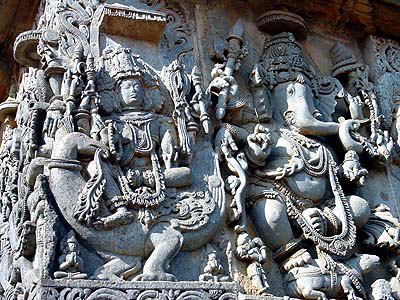 | |
| One of the best sculptures @ Halebedu |
 |
| @ Halebedu temple ..Whole group |
We reached Beluru around at 4:30 PM; it is just 16 KMs from Halibedu. The temple here was Chenna Kesawa swamy (Good looking Vishnu in meaning). Unfortunately the temple was closed for that day. Unlike Halibedu, Beluru temples were 100 % completed. Even Sri krishna devaraya has done some renovations to this temple during his kingdom.
King Vishnuvardana and his qween Shantala devi who has paid attention and developed these two places.As like all the temples there was pushkarani in this temple complex as well. The surprising stuff is that, there was one prototype temple in the same complex which we can see for the original temple. The star base for both prototye and main temple was really powerful. The sculpture and temple architecture is simply superb. I don't think modern artists can build this kind of fine artistic monuments just with hands.The temple is one of the finest examples of Hoysala architecture, there is no doubt for this.
 |
| at Belur Temple .. |
One line to say about these two places is "Belur - Halibedu are pride to India in terms of its culture and its standards". I never imagined 2D and 3D views in the sculptures till I see this place. Hats-off to the creativity of architects and artists involved in this great fine monuments and sculptures in this temple.
Finally we started our retrun journey to Bangalore around at 7 PM and everybody took rest and reached our places almost by mid-night.
It was a good trip after long time for all of us....looking for some thing different this time .. Let's wait and see...
 |
| At Belur temple .. |
Popular Posts
-
The best solution to know about these init levels is to understand the " man init " command output on Unix. There are basically 8...
-
How to Unlock BSNL 3G data card to use it with Airtel and Vodafone Model no : LW272 ? How to unlock BSNL 3G data card( Model no : LW272 )us...
-
How to transfer bike registration from one State to other (Karnataka to Andhra)?? Most of us having two wheelers purchased and registered in...
-
Latest Post on ETV D3 Old Post on ETV D1 D2 link ETV Dhee 3 - D3 - Enjoy maadi ETV Dhee feedback link - Direct ETV site use this...
-
ఓం శ్రీ స్వామియే శరణం ఆయ్యప్ప!! Related posts : Trip to Sabarimala - Part 1 Trip to Sabarimala - Part 2 Ayappa Deeksha required things...


